


One of the coolest things about Teslas is that everything is operated through this giant screen right in the middle. If you’re looking at a Model 3 or Y, that means you’re looking at a 15-inch screen. The Model S and Model X take it to the next level and offer a 17-inch screen. This screen really is the control panel for everything you want to check. This is where you see the speedometer, the amount of range you have left, the GPS for navigating, and the surround cameras on the car that are super helpful when you’re backing into a parking spot.
It doesn’t end there. Want to turn up the heat? Change your seat? Line up your favorite tunes to play in a queue? Maybe even get in some gaming while waiting around? It’s all available on the screen. And when Tesla has their fun holiday treats that everyone is talking about, they appear back on the screen.
Here’s something Tesla does that is just plain unique – every year around the holiday season, they release this special software update that simply shows up in your vehicle one day. It’s like waking up to find a Christmas present waiting in the driveway. There are no visits to the showroom, no scheduling – it simply downloads over the Wi-Fi network while your vehicle is parked in the driveway, just like downloading an app on your smartphone.
These holiday software updates have sort of become a tradition, and they are well appreciated for the “Easter eggs” that come along with them. These are simply ways that add some holiday cheer to your Tesla by making it fun and merry during Christmas.
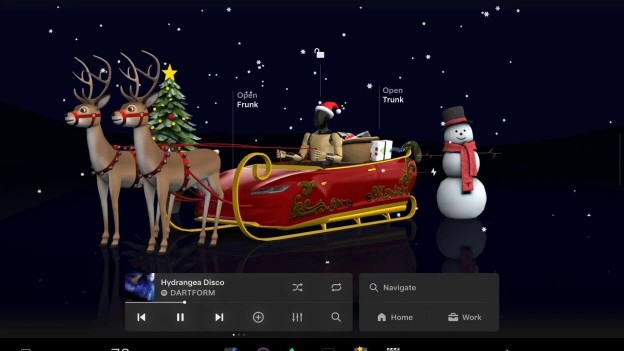
The big attraction? Santa Mode. This has actually been around for a few years, and it is just adorable. Turn it on, and your car screen will change to a Christmas scene. Your Tesla isn’t just your car – it’s Santa’s sleigh with the Christmas goodies in the back. The cars driving around you? Reindeer. The people crossing the road? Elves scurrying around.
The entire screen is filled with lightly falling snowflakes, your turn signals sound and look like sleigh bells ringing rather than your usual beep sound, and your interior lights may just come alive with bright red, green, and white colors. Starting it up is a cinch, and you only need to say “Ho Ho Ho” to your voice command system (which plays “Run Rudolph Run” for you, mind you), or you can access it via your Toy Box menu and turn it on there. Even your exterior speakers, if you have them installed in your Tesla, can play Christmas tunes for everyone around you to hear.
Now, this update this year, the 2025 Holiday Update (Version 2025.44), really amps things up. Per the good people over at notateslaapp.com, Tesla has gone back and completely overhauled the look of the “Santa Mode.” This includes things like snowmen and Christmas trees standing guard along the roads you pass, holiday lights adorning stop signs and traffic lights, snow falling in front of you, to the extent that there is now a sound effect when you lock your car that appropriately “jingles.”
Now, here’s the most awesome part: Your very own Santa has now been replaced by the Tesla Optimus robot! Yes, the humanoid robot they’ve been working on is the one guiding your sleigh on the screen now. Pedestrians also appear as elves (nothing’s changed just yet), and when you’re stationary, there’s a very nice, enchanting snowman dancing display and a Christmas tree – although you’ll experience the best on the newer models. The update also offers a few other minor conveniences. The new light show, “Jingle Rush,” uses brighter colors with longer patterns. Simply park your car outside, turn on this option, and watch as your neighbors come out to see what all the fuss is about—it really does show well. In the Toy Box, a new “Photobooth” allows drivers to take photos with their cabin camera, which can then be adorned with holiday-themed stickers and filters with a click, all shared through the Tesla app. The “Paint Shop” allows drivers to outfit their virtual car with new holiday wraps, colored window decals, or customized car tags. Tesla’s tradition of offering Christmas updates is one way to clearly demonstrate how it focuses on making ownership an enjoyable experience. Going back to when Santa Mode first transformed your commute into a winter wonderland, to this year with robot Santa and all the snowy details, this is technology that puts a smile on everyone’s face during Christmas. It’s not all about getting from A to B – it’s about making the experience a little bit more enjoyable, a little bit more magical, especially at this time of year.
By. Hyeonjun Son
Citations
NotATeslaApp. “Tesla Announces 2025 Holiday Update: Grok Commands, New Santa Mode, Dashcam FSD Overlay, But Lacks CarPlay.” NotATeslaApp.com, 6 Dec. 2025, www.notateslaapp.com/news/3388/tesla-announces-2025-holiday-update-grok-commands-new-santa-mode-dashcam-fsd-overlay-but-lacks-carplay.
NotATeslaApp. “Tesla’s Santa Mode: Everything It Does and How to Activate It.” NotATeslaApp.com, 5 Dec. 2025, www.notateslaapp.com/news/38/tesla-santa-mode-easter-egg.
Image Source
